Local and private
Everything runs on your machine. The server only listens on 127.0.0.1 and your code is never uploaded. Credentials for private Git repositories live in the operating system's key store, never in a file or a URL.
- 127.0.0.1
- Keyring
Open source · local · in development
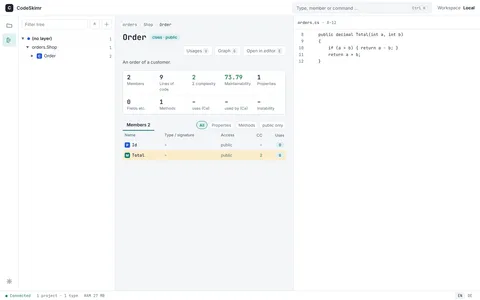
Who uses this method, and what breaks if I change it? CodeSkimr scans a repository once and answers that in the browser, on the command line or through MCP for your AI assistant. Local, fast, free, and honest about how certain a hit is.
Features
Everything runs on your machine. The server only listens on 127.0.0.1 and your code is never uploaded. Credentials for private Git repositories live in the operating system's key store, never in a file or a URL.
A Rust program with SQLite, no background service and no account. Every interaction has a time budget (for example search under 10 ms per keystroke, re-scanning changed files under 300 ms) that is measured in every build. MIT licence, the source is public.
C#, Java, Kotlin, Python, Rust, TypeScript, TSX and JavaScript with types, members, signatures, doc comments, visibility, metrics and references. C, C++, Go, PHP and Ruby at a basic level. A project can mix languages; the scan screen shows the level of every language found.
Claude Code, Cursor and other agents ask CodeSkimr through MCP: search symbols, read signatures, find usages and impact, check whether something similar already exists and check conventions. All tools are read-only except the rescan.
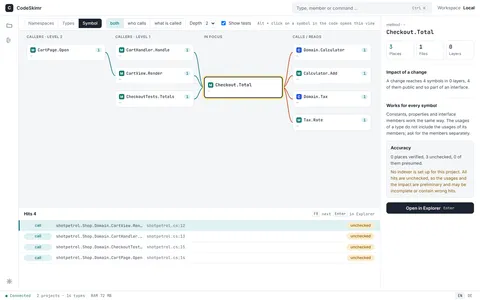
For every symbol: who calls it, what does it call, and which symbols, layers and public interfaces can a change reach? As a graph with a hit list, depth 1 to 3 or all, tests on or off.
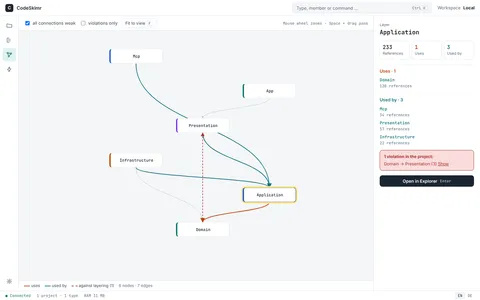
You define layers, CodeSkimr shows them as boxes and how they depend on each other. Lines against the layering and cycles are marked. The program computes the layout itself, so the same project always gives the same picture.
Every usage says where it comes from: “verified” when the language's compiler indexer confirmed it (level 2, SCIP), “unverified” when it was resolved by name only (level 1), “presumed” for calls through base types. Without an indexer you see that openly on screen instead of getting hits presented as certain. You install the indexers yourself, CodeSkimr never downloads anything.
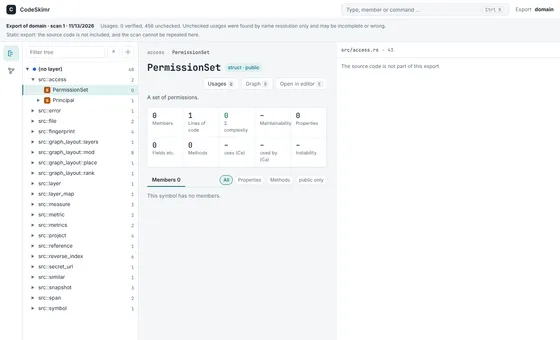
A single HTML file with explorer and layer map, no server needed to view it. It contains no source code, no paths and no token; unverified usages stay visible as such. You should still read signatures and doc comments before passing it on.
Views
Sharing
The HTML export (codeskimr export, option --html) takes the structure of your code with it, not the code itself. The banner at the top of the picture says how many usages are verified.
Installation
cargo build --release --locked, then the interface in web/ with npm ci && npm run build.codeskimr: the server and the browser open. Add a project and scan it, then search in the explorer.claude mcp add codeskimr -- codeskimr mcp --project /path/to/project.git clone https://github.com/stacknoise/CodeSkimr
cd CodeSkimr
cargo build --release --locked
cd web && npm ci && npm run build && cd ..
./target/release/codeskimrThe manual (German and English) is in the repository under docs/manual. The accuracy of usages is measured per language and documented in docs/accuracy.md; usages without a set-up indexer stay “unverified”. README on GitHub ↗

Questions, ideas or a bug? An issue on GitHub helps, and so does an email.